
Kit (formerly ConvertKit) review: is it the right email tool for creators?
I've used ConvertKit, now called Kit, for years. Here's what the free plan really includes, real prices at 3K and 10K subscribers, how automations work, and the affiliate-link rules most reviews skip.
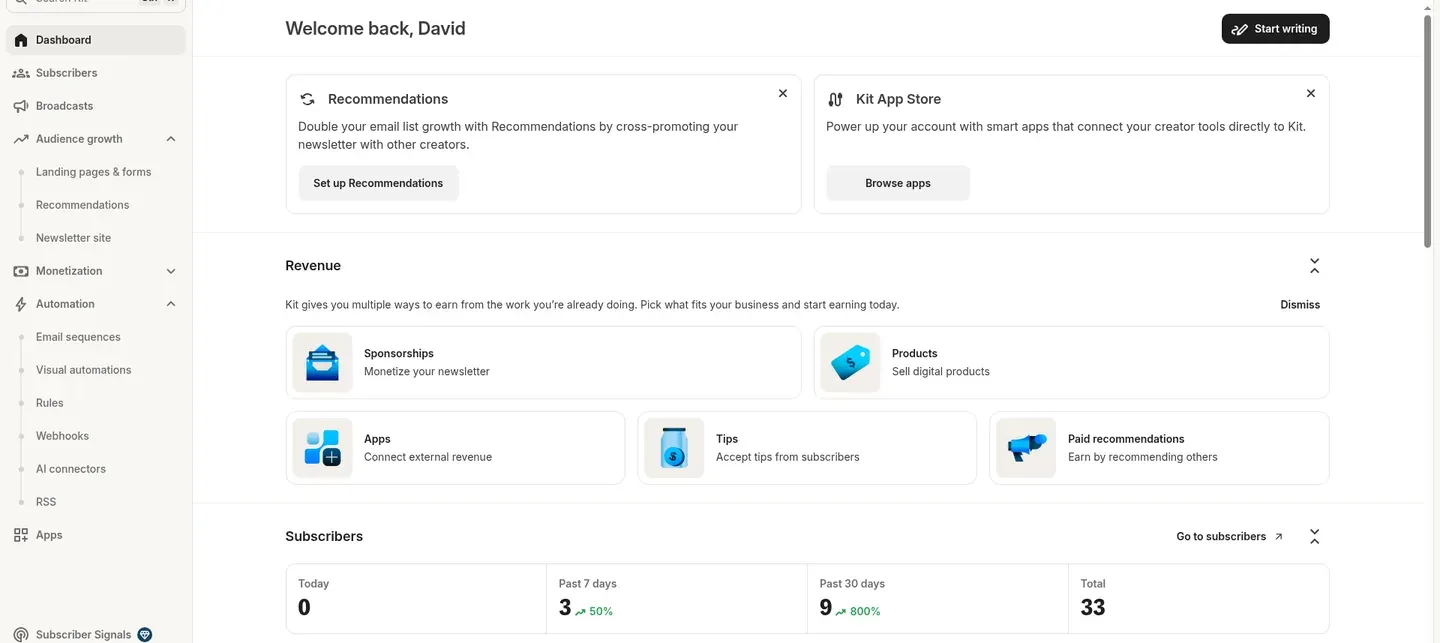
Yes, for most creators. Kit (formerly ConvertKit) is one of the best email tools for email, landing pages and tag-based automations. Free is $0 for up to 10,000 subscribers with unlimited landing pages and forms. Sequences and automations need Creator ($59 a month at 3,000 subscribers). Need full websites, funnels or courses? systeme.io fits better.
Key facts, checked Oct 28, 2026
- What it is
- Email marketing platform for creators: newsletters, broadcasts, sequences, Visual Automations, landing pages, forms and Commerce
- Former name
- ConvertKit (renamed Kit in October 2024)
- Founder and HQ
- Nathan Barry, founded January 2013; Kit, Inc., Boise, Idaho
- Free plan
- $0 up to 10,000 subscribers; unlimited landing pages and forms; no sequences or automations
- Trial
- 14 days on paid plans
- Paid pricing
- Creator $59/mo at 3K, $139/mo at 10K; Pro $99/mo at 3K, $189/mo at 10K (monthly billing; annual saves 17%)
- My rating
- 4.8 out of 5
- Best for
- Creators, newsletter writers, YouTubers, podcasters, course creators and content-led affiliate marketers
- Not for
- Pure promo or make-money-online lists; anyone who needs full websites and funnels in one tool
Sources: kit.com/pricing, Kit's story, Kit imprint. Checked Oct 28, 2026.
If you're a creator who needs an email editor, an email system and landing pages, Kit is the one I'd pick
Who Kit is for
- Creators, YouTubers, podcasters and newsletter writers growing a list
- Online marketers who want clean, simple emails
- Content-led affiliate marketers who teach first
- Anyone starting out: free up to 10,000 subscribers
- People who sell digital products or paid newsletters
Who Kit is not for
- Pure promo or make-money-online lists
- You need full websites, funnels and courses in one tool
- You need automations but want the lowest price
out of 5, my rating
About the author: David Frizzell runs Beach Bum University, where he teaches online and affiliate marketing for creators. He has used ConvertKit, now Kit, for years and runs his own lists on Kit and systeme.io.
A ConvertKit review, renamed
Kit is ConvertKit with a new name: an email marketing platform built for creators.
Nathan Barry started ConvertKit in January 2013, when he needed a better way to reach his audience as a blogger and sell books and courses by email. The company, based in Boise, Idaho, renamed itself Kit and moved to kit.com in October 2024. So if you were looking for a ConvertKit review, this is it: same company, same tools.
Those tools are a simple email editor, broadcasts, email sequences, forms, landing pages, tags and Visual Automations. Kit has added more ways to grow and earn, like the Creator Network, Paid Recommendations, the Sponsor Network and Commerce. Kit is subscriber-based: you pay for each active subscriber once, no matter how many tags or forms they're on.
I've used ConvertKit for years, and I still use both Kit and systeme.io today. If you just need an email editor, an email system and landing pages as a creator, Kit's the way to go. If you need more, like full web pages, funnels and all that stuff, I'd recommend looking at systeme.io.
— David
How much is Kit? $0 up to 10,000 subscribers.
You pay once you need sequences and automations. Annual billing saves 17%, and paid plans have a 14-day trial.
Free
$0
up to 10,000 subscribers
- Unlimited forms and landing pages
- Email broadcasts
- Creator Network
- No sequences or automations
Creator
$59/mo
at 3,000 subscribers, monthly billing
- Everything in Free
- Unlimited Visual Automations
- Unlimited sequences
- Free migration
Pro
$99/mo
at 3,000 subscribers, monthly billing
- Everything in Creator
- Subscriber Signals and engagement scoring
- Deliverability reporting
- Unlimited users, priority support, Growth Concierge
| Plan | 3,000 subscribers | 10,000 subscribers | What you get |
|---|---|---|---|
| Free | $0 | $0 | Forms, landing pages, broadcasts. No sequences or Visual Automations. |
| Creator | $59/mo | $139/mo | Unlimited Visual Automations and sequences |
| Pro | $99/mo | $189/mo | Subscriber Signals, Growth Concierge, engagement scoring, deliverability reporting, unlimited users, priority support |
Prices checked Oct 28, 2026 from the official Kit pricing page, monthly billing. Annual billing saves 17%. Kit prices by list size, so use its pricing calculator for your number, and check the page before you buy.
Which Kit plan do you need? Three quick taps.
1. Do you need automated email sequences or automations?
2. How big is your list?
3. Need deliverability reporting, engagement scoring or a team?
Free
$0
Start free with Kit →Based on Kit's posted prices at 3,000 and 10,000 subscribers. Kit prices by list size, so check its calculator for your exact number.
Is Kit free, and what does it leave out?
For many new creators, Free is enough: build a landing page, collect emails and send a weekly broadcast.
Kit fees when you earn
Commerce
3.5% + 30¢
Per sale on digital products, paid newsletters and tips. Includes card processing.
Sponsor Network
23.5%
Of newsletter ad revenue. Paid via Stripe about 45 days after month end.
Paid Recommendations
20% + 3.5%
Service fee plus transaction fee, run through SparkLoop. Advertisers pay $1 to $4+ per subscriber.
Creator Network
Free
Mutual recommendations with up to 100 creators.
Fees from Kit's pricing page and help center (Paid Recommendations, sponsorships), checked Oct 28, 2026.
Set up ConvertKit (now Kit) in an afternoon
In the order I'd do it:
- Create a free Kit account. Sign up on the Free plan at kit.com. It covers up to 10,000 subscribers, so you can build and test before paying.
- Add your sender details. Enter the name and email your emails come from, plus the mailing address Kit adds to the email footer.
- Verify your sending domain. Add the DNS records Kit gives you at your domain host, so your emails send from your own domain.
- Build a landing page or form. Pick a template or an inline form, write one clear promise, and add email and first name fields.
- Set up the confirmation (incentive) email. Keep double opt-in on (Kit's default) and redirect to a download or thank-you page to deliver your lead magnet.
- Plan your tags. Create a tag for each lead magnet and topic, so you can segment and trigger automations later.
- Write your welcome email. Send it as a broadcast on Free, or as an email sequence once you upgrade to Creator.
- Embed the form on your site. Paste Kit's JavaScript or HTML embed code, or use the WordPress plugin, then send a test signup to yourself.
How to verify your domain in Kit
Domain verification is the step most people skip. Kit gives you DNS records to add at your domain host (GoDaddy, Namecheap, Cloudflare and so on). Once they're live, your emails send from your own domain, which helps them look trustworthy.
How to migrate your email list into Kit
Export your list as a CSV from your old tool and import it into Kit, keeping tags. Or let Kit do it: migration is free, and Kit's team rebuilds your forms, templates and automations. Only import people who opted in.
Built for emails that read like a note from a real person
You write broadcasts (one-time emails) and sequence emails in the same editor: subject line, preview text, a simple formatting toolbar and personalization like a first-name greeting. You can save templates and styles so every email looks consistent.
It's not a drag-and-drop designer for heavy, image-packed emails, and that's on purpose: plain, personal emails are what creators send.
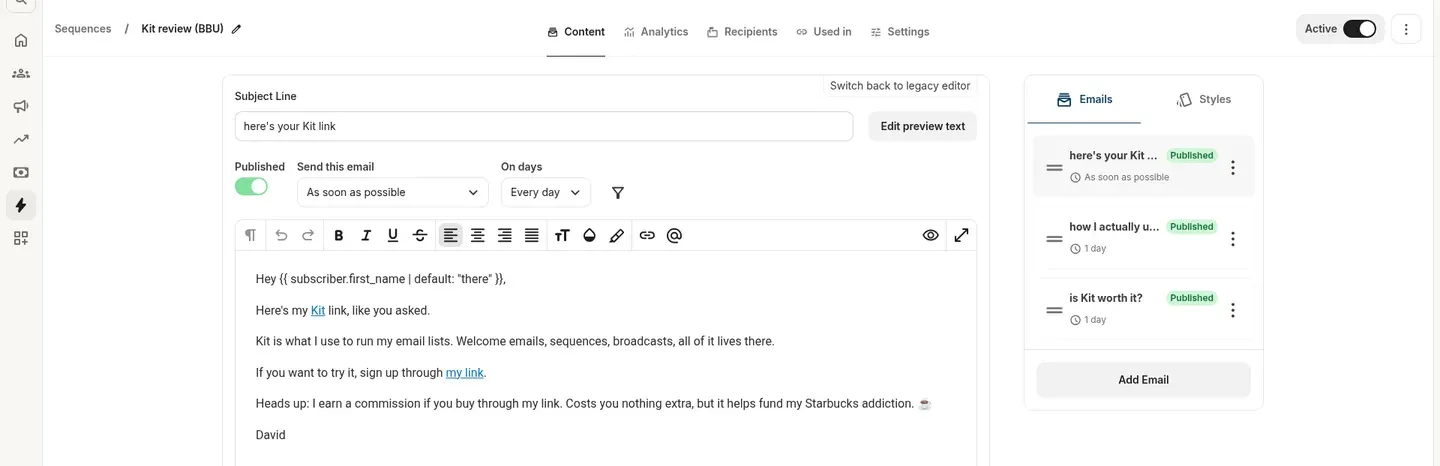
Kit email sequences (autoresponders)
A sequence is a set of emails that goes out on a schedule after someone joins. Sequences need Creator or Pro. Each email has its own send timing: the first one as soon as possible, the next ones a day apart. You can pick which days of the week they send, and reorder emails on the right.
One gotcha: a sequence won't start on its own. Connect your form to it with a Rule or a Visual Automation.
Who enters, what happens, and who goes where
Visual Automations are Kit's flow builder. They need Creator or Pro.
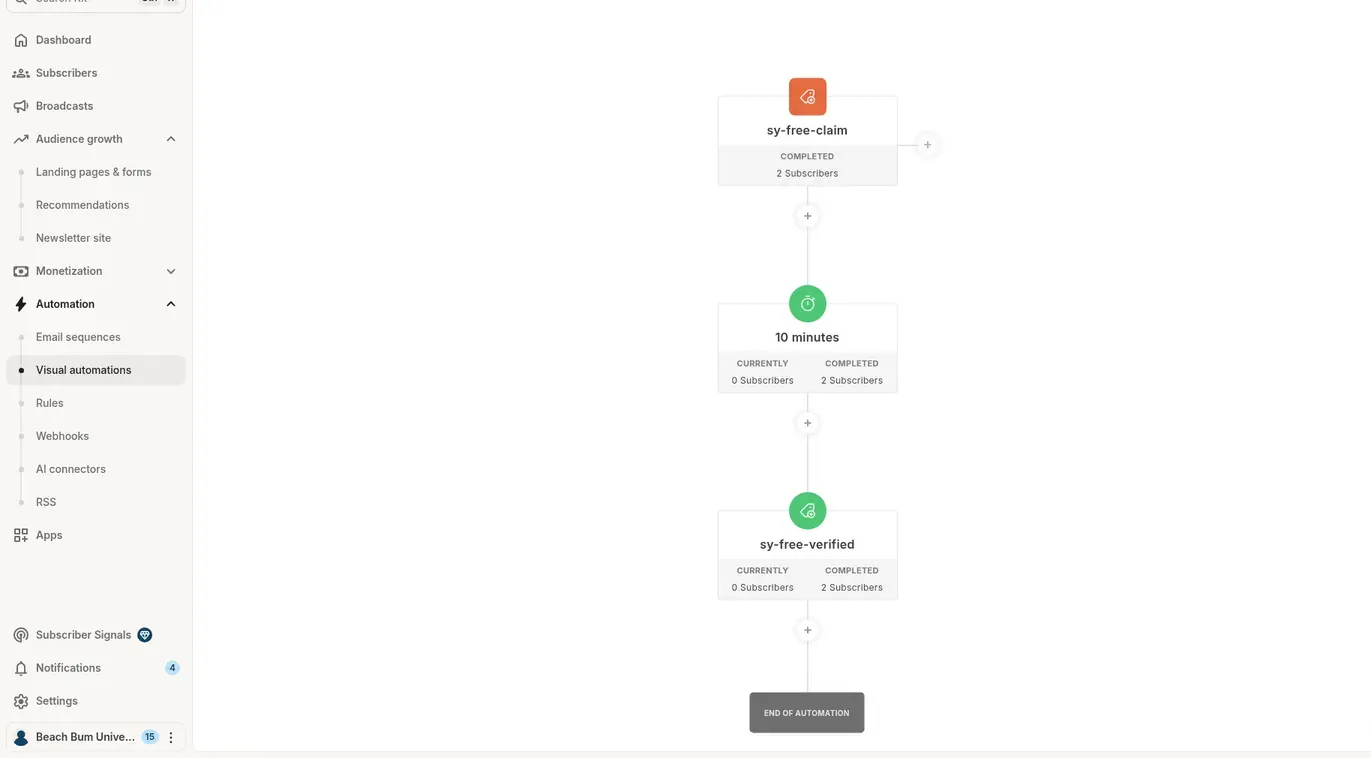
Entry points
Up to 5 per automation: joining through a form or landing page, a tag added, a custom field changed, or a purchase.
Actions
Send an email sequence, wait, add or remove a tag, set a custom field, move to another automation, or unsubscribe.
Events
Wait for something to happen: a tag added or removed, a date, a purchase or a field change.
Conditions
Split people by tags, custom fields, advanced filters or email opens, so each subscriber gets the right next email.
How to use a link trigger in Kit (Rules)
Rules are simple if-then jobs. Triggers include subscribing to a form, finishing a sequence, clicking a link, a tag change or a purchase (including from tools like Shopify or Teachable). Actions are subscribe or unsubscribe, add or remove a tag, or set a field. A link trigger is a Rule that tags whoever clicks a link.
Kit tags vs segments
Tags are fixed labels, and they can trigger automations. Segments are live filters built from tags, forms and fields. Use tags for what someone did, segments for who to email.
Heads up: automations aren't retroactive. People already on your list don't enter a new automation, so tag them first if you want them in.
Three Kit automation recipes for creators
Lead magnet delivery
Entry: joins your checklist form. Action: welcome sequence with the download, then tag "checklist".
Link-trigger interest tagging
In a broadcast, link to two topics. A Rule tags whoever clicks, so next week you email each group what they asked for.
Purchase follow-up
Entry: purchase. Action: a thank-you and onboarding sequence, then a condition that checks opens and resends the key email to people who missed it.
Sources: Kit help center on Visual Automations, Rules and tags and segments.
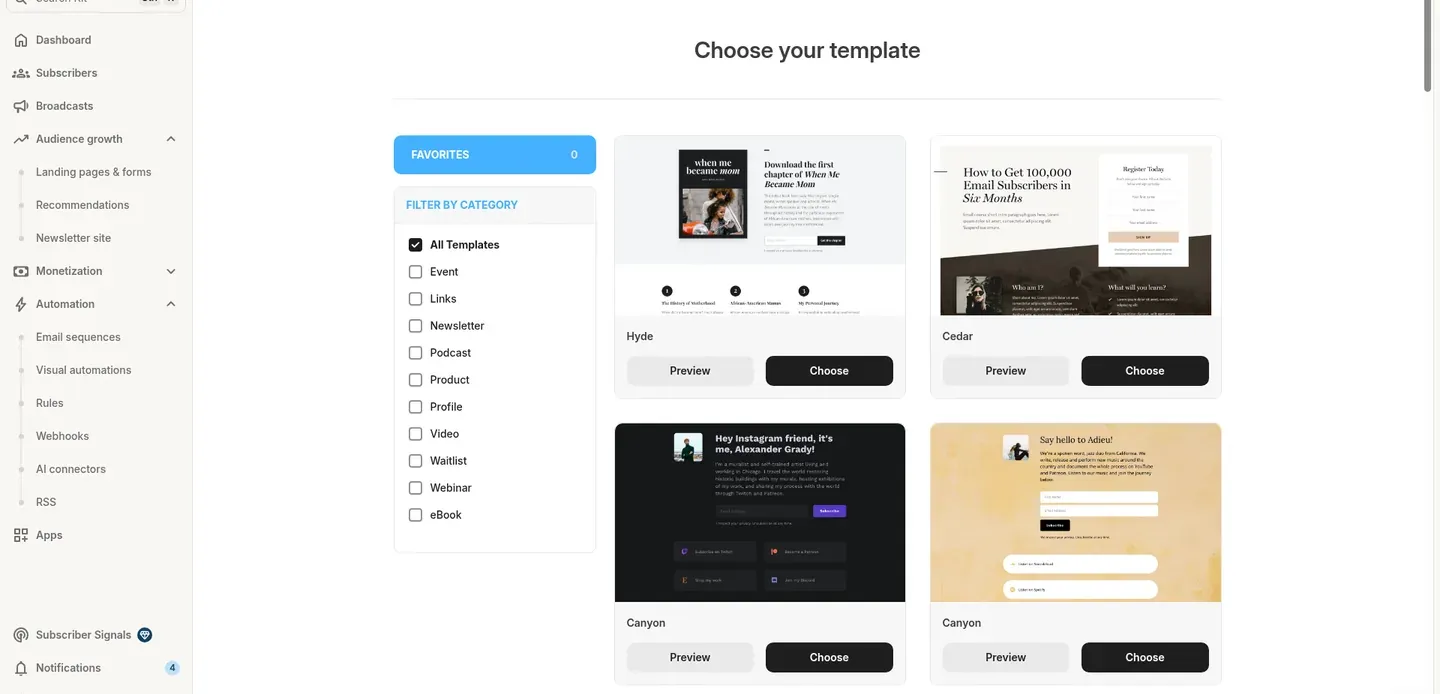
Unlimited landing pages on every plan, Free included
A Kit landing page is a one-page signup page: a headline, a short pitch, an image and a form. Start from a template filtered by type (newsletter, podcast, webinar, eBook, waitlist and more), host it on Kit or your own domain, and point your bio link or ads at it. It's perfect for a lead magnet or newsletter signup.
What it isn't: a full website or sales funnel builder. If you need multi-page sites, order forms, upsells and courses in one place, an all-in-one tool like systeme.io fits better.
WordPress, Squarespace, GoDaddy and 100+ apps
Kit forms come as inline, modal, slide-in or sticky bar, and you can style them without code. Copy the JavaScript or HTML embed code onto WordPress, Squarespace, a GoDaddy site or any page builder, or use Kit's WordPress plugin.
Each form can add a tag, start a sequence and send the confirmation (incentive) email with your lead magnet. Kit also lists 100+ direct apps in the Kit App Store, plus an API and the Kit MCP for AI tools.
See how many people join each day
The Landing Pages and Forms analytics tab charts new subscribers per day with today, 7-day, 30-day and total counts. Broadcasts and sequences have their own open and click stats. Pro adds deliverability reporting and engagement scoring.
Kit states a 99.80% delivery rate on its compare page; that's Kit's own claim, with no method given.

Built-in ways to grow and earn from your list
Kit Creator Network
Free mutual recommendations with other creators. You can recommend up to 100 creators, with 5 shown at a time, and they can recommend you back.
Kit Commerce
Sell digital products, paid newsletters, subscriptions and tips. Kit says it takes 3.5% + 30¢ per sale, card processing included.
Sponsor Network and Paid Recommendations
The Sponsor Network places ads in your newsletter and keeps 23.5% of the ad revenue. With Paid Recommendations (through SparkLoop), other creators pay for subscribers you send them, and Kit takes a 20% service fee plus 3.5%.
None of these are a promise of earnings. They're tools, and how they work out depends on your audience and your content.
You can use affiliate links in Kit, but your list has to be about your content
This is the part most ConvertKit affiliate marketing guides skip. Here's what Kit's own help center says.
Kit's rule of thumb for your emails
Kit's guide says roughly 70 to 80% your own content and 20 to 30% affiliate. A list that only sends promos breaks the rules.
- Label your affiliate links clearly.
- Keep most of your content your own: tutorials, reviews and honest stories.
- No 100% affiliate content. A promo-only list breaks the rules.
- Off-limits categories for affiliate links: education, loans, online pharmacies and "get rich quick" software.
- Make-money-online and CPA affiliate content are prohibited under Kit's Acceptable Use Policy, and new accounts are reviewed.
- Link shorteners and JVZoo links are blocked. Use the full affiliate link in your emails.
My take: Kit works great for affiliate marketers who teach first: tutorials, reviews and honest stories, with a link where it helps. If you make video walkthroughs for your list, my Tella review covers the screen recorder I use. If your plan is a pure promo list, Kit is the wrong tool. Read the rules yourself in Kit's help center: affiliate links, acceptable use and blocked links.
The good and the annoying
Pros
- Free plan up to 10,000 subscribers, the biggest free list in this comparison
- Unlimited forms and landing pages on every plan, Free included
- Tags, not lists: you pay once per subscriber, no matter how many tags they have
- Visual Automations with up to 5 entry points, events and conditions
- Simple Rules for if-this-then-that jobs like link-click tagging
- Built-in ways to earn: Commerce, paid newsletters, tips, sponsorships and Paid Recommendations
- Free Creator Network recommendations to grow your list
- Clean, simple email editor that keeps emails looking like a real person wrote them
- Free migration: Kit's team rebuilds your forms, templates and automations
- 100+ integrations, an API and a Kit MCP for AI tools
Cons
- Free plan has no sequences or Visual Automations
- Paid plans cost more than MailerLite, Flodesk, beehiiv Lite or systeme.io once you need automation
- Strict affiliate-content rules: no pure promo or make-money-online lists
Email tool or all-in-one?
Kit is the better pure email tool for creators. systeme.io is the better pick if you need full sites, funnels and courses too.
Pick Kit if
- Email is the center of your business
- You want a clean editor and tag-based automations
- You want a free list up to 10,000 subscribers
- You want built-in recommendations and sponsorships
Pick systeme.io if
- You need full web pages, funnels and order forms
- You want courses, a blog and email in one login
- You want automation at a lower price (Startup $17/mo)
- You'd rather not glue several tools together
I use both: Kit for my creator email, systeme.io when I need pages and funnels. Read my full systeme.io review to see if it fits you better.
Kit vs Mailchimp, beehiiv, MailerLite, Flodesk and Substack
Kit has the biggest free list here. Once you pay for automation, it costs more than most.
Swipe the table sideways →
| Tool | Free plan | Paid pricing |
|---|---|---|
| Kit | Up to 10,000 subscribers; no automations or sequences | Creator $59/mo at 3K, $139/mo at 10K (monthly) |
| systeme.io | 2,000 contacts, unlimited emails | Startup $17/mo (5K contacts); Webinar $47/mo (10K contacts) |
| beehiiv | Up to 2,500 subscribers | Lite $49 / Pro $95 per month at 1,000 subscribers (yearly billing) |
| MailerLite | 250 subscribers, 2,500 emails a month | See their site for your list size |
| Mailchimp | Under 250 contacts | See their site for your list size |
| Flodesk | Free forms and pages (no sending listed) | Lite $72 / Pro $79 per month at 10K (monthly) |
| Substack | Free to publish | Takes 10% of paid revenue plus card fees |
Free plans and prices from each official pricing page, checked Oct 28, 2026. Prices that only show in a calculator weren't verified, so check each site for your list size.
Kit vs Mailchimp
Mailchimp's free plan covers under 250 contacts, and Customer Journeys need Standard or higher. Kit is simpler and built for creators rather than stores, with a far bigger free plan.
Kit vs beehiiv
beehiiv is built around publishing a newsletter, with a free plan up to 2,500 subscribers and 0% take on paid subscriptions (plus Stripe fees). Kit gives you a bigger free list and deeper tag-based automation.
Kit vs MailerLite
MailerLite is the price pick, but its free plan stops at 250 subscribers and caps free automations. Kit wins on creator features like recommendations, sponsorships and Commerce.
Kit vs Substack
Substack is free to start but takes 10% of paid revenue. With Kit you pay a subscription and own the list, the look and the automations.
Kit vs Flodesk
Flodesk is design-first and cheaper at 10K subscribers, with 1 workflow on Lite (listed as a limited-time bonus). Kit has deeper automation and creator monetization.
Kit vs ActiveCampaign
ActiveCampaign has no free plan shown and is aimed at businesses that want multi-step automation. Kit is easier for a solo creator and starts free.
Is Kit worth it? For creators, yes.
I've used it for years. Start on the free plan, build one landing page and send a few broadcasts. Upgrade to Creator only when you need sequences or automations. If you find you need full websites and funnels, look at systeme.io instead.
Start on the free plan
$0
- Up to 10,000 subscribers
- Unlimited forms and landing pages
- Email broadcasts
- Upgrade when you need automations
Affiliate link. I earn a commission at no extra cost to you.
Straight answers
Is ConvertKit the same as Kit?
Yes. ConvertKit renamed itself Kit in October 2024 and moved to kit.com. It's the same company, founded by Nathan Barry in 2013 and based in Boise, Idaho, with the same accounts and tools: email, forms, landing pages, sequences and Visual Automations.
Is Kit free?
Yes. The Kit Free plan is $0 for up to 10,000 subscribers, with unlimited forms, landing pages and email broadcasts. It leaves out email sequences and Visual Automations, which need Creator or Pro. Free pages and forms also show Built with Kit branding.
How much is Kit per month?
On monthly billing, Creator is $59 a month at 3,000 subscribers and $139 at 10,000. Pro is $99 at 3,000 and $189 at 10,000. Annual billing saves 17%, and paid plans come with a 14-day trial. Prices checked Oct 28, 2026.
Is Kit worth it?
For creators, yes. Start on the free plan, build one landing page and send a few broadcasts. Pay for Creator only when you need sequences or automations. If you need full websites and funnels too, an all-in-one tool may fit better.
Who founded Kit (ConvertKit)?
Nathan Barry founded ConvertKit in January 2013 and is still the founder and CEO of Kit. The company is based in Boise, Idaho, and changed its name from ConvertKit to Kit in October 2024.
Kit vs beehiiv vs Substack: which is best for starting out?
Kit has the biggest free plan: up to 10,000 subscribers, versus 2,500 on beehiiv's free plan. Substack is free to publish but takes 10% of paid subscription revenue. Pick Kit to own the list and automate; pick Substack for a simple paid publication.
Kit vs Mailchimp: which is better for creators?
Kit is built for creators, with tags, landing pages and creator monetization. Mailchimp's free plan covers under 250 contacts, and its Customer Journeys need a paid plan. For a newsletter or a course business, Kit is the simpler fit.
How do I set up Kit and verify my domain?
Sign up on the Free plan, add your sender details, then verify your sending domain by adding the DNS records Kit gives you at your domain host. Next, build one form or landing page, set up the confirmation email and send yourself a test.
What is a Kit incentive email?
It's Kit's confirmation email, also called the incentive email. It goes out right after someone subscribes, asks them to confirm (double opt-in) and can deliver your lead magnet as a download or send them to a thank-you page.
How do link triggers and Visual Automations work in Kit?
A link trigger is a Rule: when a subscriber clicks a chosen link, Kit adds a tag or starts a sequence. Visual Automations add up to five entry points, delays, events and conditions. Automations need a paid plan and aren't retroactive.
How do I migrate my email list into Kit?
Export your subscribers as a CSV and import them into Kit, keeping tags so you can rebuild segments. Kit also offers free migration: its team rebuilds your forms, templates and automations. Only import people who opted in.
Can I use affiliate links in Kit emails?
Yes, with limits. Kit's help center says affiliate links must be clearly labeled and most of your content, roughly 70 to 80%, should be your own. Pure promo lists, make-money-online and CPA affiliate content are prohibited, and link shorteners and JVZoo links are blocked.
What fees does Kit charge when I sell or earn?
Commerce sales cost 3.5% + 30 cents, card processing included. The Sponsor Network keeps 23.5% of ad revenue. Paid Recommendations through SparkLoop carry a 20% service fee plus a 3.5% transaction fee. The Creator Network is free.
Does Kit integrate with WordPress, Squarespace or GoDaddy?
Yes. Kit forms embed on WordPress, Squarespace or a GoDaddy site with Kit's JavaScript or HTML embed code, and WordPress also has a plugin. Kit lists 100+ direct integrations in its App Store, plus an API and an MCP for AI tools.
More honest reviews
Get Kit
- Enter your email and first name below.
- You go straight to Kit to start free.
Loading the form…
No thanks, just take me to Kit
Affiliate link. I earn a commission at no extra cost to you.