
Tella review: the screen recorder I use to make my videos
For online and affiliate marketers who want polished screen recordings without a video team. I record and edit my own YouTube videos in Tella. Here's what it costs, what I like, and what I don't.
Sign up through my link and Tella gives new users 30% off for 12 months on a paid plan.
The screen recorder I kept after trying the rest.
- What it is
- A screen recorder and AI video editor for Mac, Windows and the browser.
- Price
- Pro $13/mo, Premium $19/mo, billed annually, or $9 and $13 for your first 12 months with my link. No free plan, a 7-day free trial.
- Best for
- Affiliate and online marketers, YouTube tutorials, talking-head videos and course lessons.
- Standout
- Layouts, auto zooms, transcript editing, 4K export and one-click publishing.
- Watch out
- Heavy auto cutting can make your voice sound choppy.
If you make screen and camera videos to sell, teach or post on YouTube, this is the fastest way I've found to make them look good
Who it's for
- Affiliate marketers making product walkthroughs and reviews
- Online marketers who embed videos on sales and bridge pages
- YouTubers who make tutorials and screen recordings
- Course creators recording lessons
- Anyone who wants to edit in the browser, not a big desktop editor
Who it's not for
- You only need quick free messages for a team
- You want a free plan forever
- You need a full film editor with color grading and multicam
- You record on your phone only
out of 5, my rating
What is Tella?
Tella (tella.tv, now tella.com) is a screen recorder and AI video editor. You record your screen, your camera or both. Then you edit in the browser: pick a layout, add zooms and text, cut by transcript, and share a link, embed it or publish to YouTube.
It runs as a native Mac app, a native Windows app, a Chrome extension and a web recorder. Recording goes up to 4K, one clip can run 6 hours, and transcripts work in 106 languages on every plan.
I've made over 100 videos in my Tella account: YouTube videos, tutorials, product walkthroughs and quick updates.
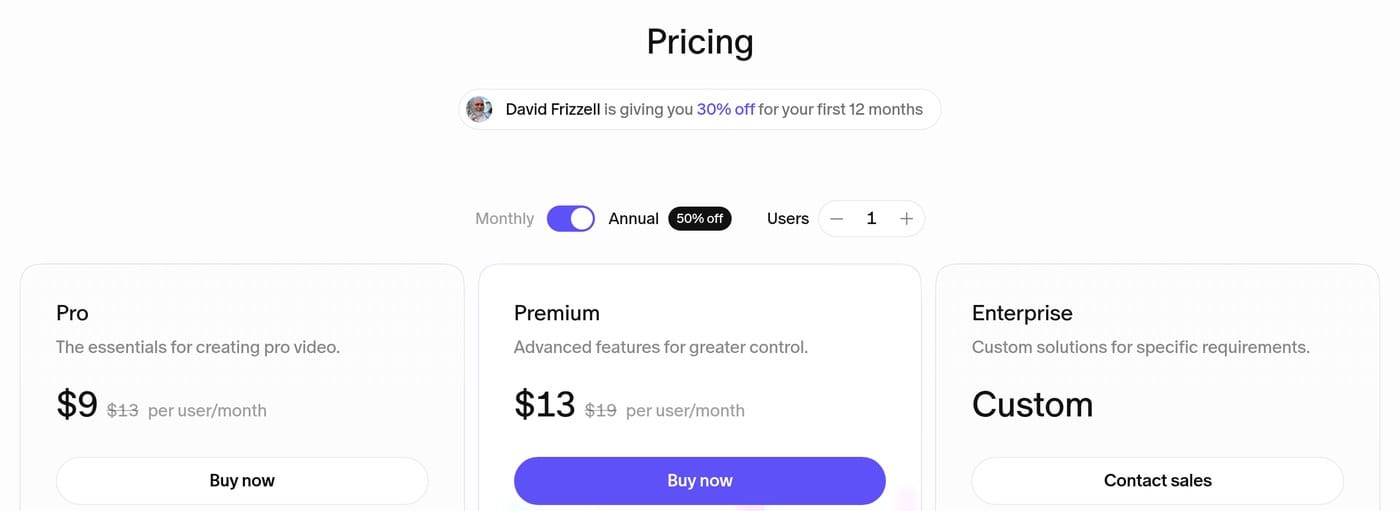
Two paid plans plus Enterprise, and 30% off your first year with my link
Every new account starts with a 7-day free trial of Pro.
Pro
$9/mo$13
30% off for 12 months with my link- Unlimited videos
- 4,500 credits a month
- Export in 4K
- Analytics
Premium
$13/mo$19
30% off for 12 months with my link- Everything in Pro
- 9,000 credits a month
- Custom domain, remove Tella branding
- 4K sharing, 60 FPS export
Enterprise
Custom
Talk to sales
- Everything in Premium
- SSO and SCIM
- Volume discounts
- SOC 2 Type II report
Prices per user for your first 12 months with my link (30% off), then regular price. Regular prices checked Oct 28, 2026 on the official Tella pricing page. Prices can change, so check the page before you buy.
Is there a Tella free plan?
No. There's a 7-day free trial, then you pick a plan. If you want a free forever recorder, look at Loom's or ScreenPal's free plans, with their limits.
What are Tella credits?
Credits pay for the Tella Agent, the AI editor you chat with in the sidebar. Pro includes 4,500 a month per user and Premium 9,000. They reset each month. You can buy more from $25 for 25,000. Tella's own pricing page gives two answers on whether trial accounts get AI credits, so check when you sign up. You can use most of Tella without touching credits.
Monthly vs annual
Annual is the cheaper way to pay: $13 vs $26 for Pro. You can cancel any time, and your plan runs to the end of the billing period.
Most Tella reviews talk about team updates. I use it to sell and teach.
Here's how it fits a marketer's week.
- Record a product walkthrough. Screen plus a camera bubble, so people see the tool and see you.
- Clean it up fast. A layout, a couple of gentle zooms, a step label or two. Done in minutes, not hours.
- Put it on your bridge page. Embed the Tella player and watch views and watch time in Tella's analytics.
- Publish it to YouTube. Tella can post to YouTube, Shorts, LinkedIn, X and TikTok without a download.
- Reuse it. Download the transcript as text and turn it into an email or a blog post.
Premium adds a custom domain and removes Tella branding, which matters if you share videos with buyers.
Tap a card to open it
The notes come from my real edits. Where I haven't used a feature on a real video, I say so and go by Tella's own docs.
🎥RecordingScreen, camera, mic and system audio, up to 4K
Record your screen, camera or both, from the Mac or Windows app, the Chrome extension or the browser. There's a teleprompter for speaker notes, and you can show keystrokes on screen. Leave that on "shortcuts only": the "all keys" setting shows everything you type.
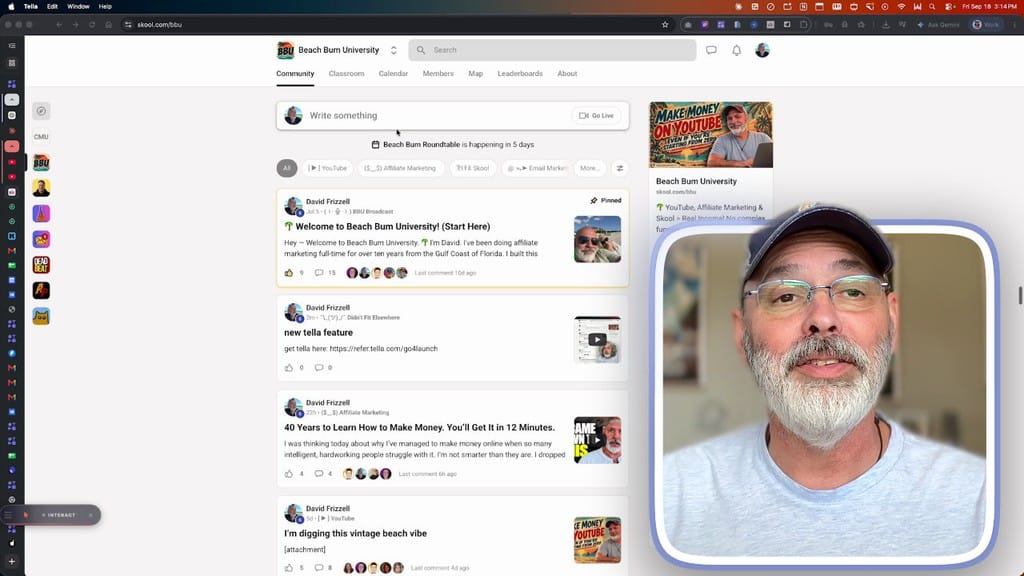
🖼Layouts and camera stylesCamera bubble, full camera, side by side, pop-out
Layouts decide how your camera and screen share the frame. I use a rounded camera bubble for most of a video and switch to full camera for the hook and outro. You can save favorite layouts. One gotcha: a new section doesn't copy the base camera style, so set it again.
Tella also offers pop-out, cut-out, blob and circle camera styles. I haven't used pop-outs on a real video yet, so that's from Tella's docs.
🔍Zooms, highlights and cursorNewAuto zoom from your clicks, or by hand
Zooms punch in on the screen. I use gentle zooms of about 4 to 6 seconds, with the camera shrinking during the zoom. Auto zoom builds zooms from your clicks with presets from Subtle to Intense. The default is stronger than I like, so I tone it down. Highlights spotlight one area and fade in and out nicely.
📝Transcript editing and AI cleanupCut words, fillers, silences and retakes
You can edit by deleting words from the transcript, and remove filler words, silences and mistakes in a click. It's accurate. But when I stripped every pause and "um," my voice sounded choppy. Now I cut lightly by hand.
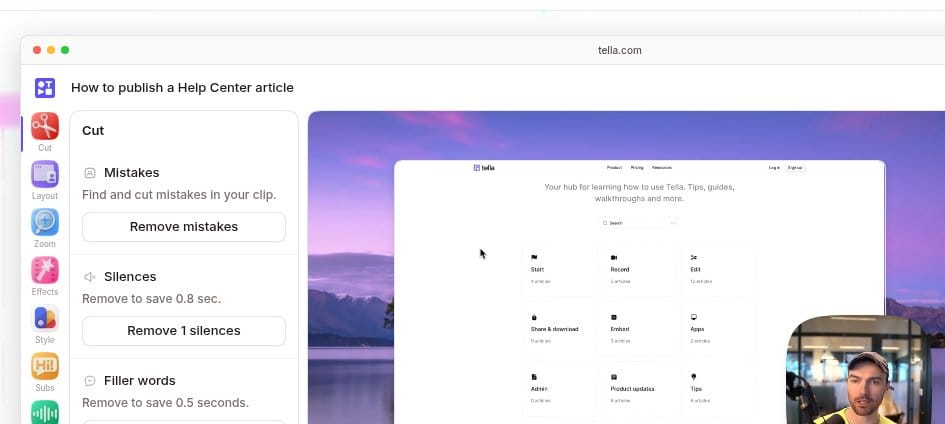
💬Tella AgentNewAn AI editor you chat with, in public beta
The Tella Agent edits your video from a chat: auto cut, auto layouts, remove mistakes, and your own saved skills. It runs on credits, or on your own ChatGPT or Claude plan.
🎬Text and motion graphicsNewSaved text styles and Tella Motion
My saved text presets (a step label and a key card) keep every video consistent. That's one of my favorite features. Tella Motion makes animated cards like a cost breakdown, and I liked the result.
📤Export, sharing and publishing4K, 60 FPS, embeds, analytics, custom domains
Every video gets a share link and an embed with view analytics. Download in up to 4K (60 FPS on Premium), or grab the audio, raw recordings, subtitles or transcript. Captions, B-roll and backgrounds are all there too; I haven't used them on a real video, so check Tella's docs for details.
YouTube, talking heads and courses
YouTube videos
Tutorials and reviews with screen plus camera, zooms and chapters, then publish straight to YouTube. This is how I make my channel videos.
Talking-head videos
Full camera layouts, a teleprompter, Studio Voice to clean up audio and eye contact correction. Good for intros and updates.
Courses and education
Record each lesson, edit by transcript, then download for your course platform or embed it. Clips run up to 6 hours. Tella also has an education program.
Screen recordings and demos
Walk through software with auto zooms on your clicks and a clean cursor. Great for product demos and support videos.
Tella ships something almost every week
Recent highlights from the Tella changelog:
- Keystrokes on screen, auto zoom presets, AI video clips and Remove Mistakes through the agent
- Tella Agent public beta for everyone, with skills, scheduled social posts and YouTube imports
- Eye contact correction and 4K playback on Premium
- Studio Voice levels and transcript downloads
- Direct publishing to YouTube, Shorts, LinkedIn, X and TikTok, plus subtitle translations
- Pop-out frames and cutting out your camera background, with a new default editor
- Tella Motion animated cards, split clips and call-to-action buttons
The good and the annoying
Pros
- Screen plus camera videos look polished fast
- Layouts, zooms and text presets keep videos consistent
- Mac, Windows, Chrome and web
- 4K recording and export, 6-hour clips
- Share links, embeds and view analytics built in
- Publishes straight to YouTube and social
- Edit by transcript, like editing a doc
- Transcripts in 106 languages on every plan
- The Tella Agent makes edits when you ask in plain words
- New features almost every week
What I don't love
- No free plan, only a trial
- Heavy filler and silence removal can make you sound choppy, so go easy on it
- No record button inside Gmail like Loom has. You can still put a Tella video in an email, it just takes a few more steps
Tella vs Loom vs Descript vs Camtasia vs ScreenPal
Tella sits in the middle on price and leads on polished screen plus camera videos.
TellaMy pick
- Plans
- Pro $13/mo yearly ($26 monthly) · Premium $19/mo yearly ($39 monthly)
- Free option
- 7-day free trial, no free plan
- Best at
- Layouts, auto zoom, transcript editing, 4K export
Loom
- Plans
- Starter $0 · Business $18/user/mo monthly (annual saves up to 17%)
- Free option
- Free plan (25 videos, 5-min recordings)
- Best at
- Quick messages, basic trimming
Descript
- Plans
- Hobbyist $16/mo yearly ($24 monthly) · Creator $24/mo yearly ($35 monthly)
- Free option
- Free plan
- Best at
- Text-based editing, AI tools
Camtasia
- Plans
- Starter $39/yr · Essentials $179.88/yr
- Free option
- Free trial
- Best at
- Desktop editor, timeline
ScreenPal
- Plans
- Deluxe $4/mo yearly · Max $10/mo yearly
- Free option
- Free plan (15-min recordings)
- Best at
- Simple recorder and editor
Screen Studio
- Plans
- Check their site for current price
- Free option
- See their site
- Best at
- Smooth zooms and cursor effects
Prices checked Oct 28, 2026 on official pages: Tella, Loom, Descript, Camtasia, ScreenPal. Check current pricing before you buy.
Tella vs Loom
Loom is great for quick team messages and has a free plan. Tella is for videos you want to look good: layouts, zooms, transcript editing, 4K and YouTube publishing. Tella also has a free tool to move your Loom library over.
Tella vs Screen Studio
Screen Studio is known for smooth zooms and cursor effects. Tella now does auto zooms, animated cursors and motion blur too, and adds hosting, analytics and a Windows app. Check Screen Studio for its current price and platforms.
Tella vs Descript
Descript is a text-first editor with a free plan and lots of AI tools. Tella is a recorder first. If you mostly record yourself and your screen, Tella is quicker. If you edit podcasts and long interviews, look at Descript.
Other Tella alternatives: Camtasia is a desktop editor with a yearly price. ScreenPal is the budget pick with a free plan. Riverside is built for remote interviews and podcasts.
Is Tella legit and worth it?
Yes, it's legit. Tella HQ is a real company with public pricing, help docs and SOC 2 Type II compliance on every plan. I use it every week.
Is it worth it? If you make videos to sell, teach or grow a channel, $13 a month is a fair price for how much time it saves me. Start with the free trial, record one real video, and decide.
Straight answers
Is Tella a good screen recorder?
Yes, for people who record themselves and their screen and want it to look polished fast. I use it to record and edit my own YouTube videos. You record your screen and camera together, then use layouts, zooms and text to clean it up in the browser.
Is there a Tella free plan?
No. Tella has no permanent free plan. Every new account starts with a 7-day free trial of Pro, then you pick Pro or Premium.
How much does Tella cost?
Pro is $13 per user per month and Premium is $19 per user per month, both billed annually. Paying month to month costs $26 and $39. Through my link, new users get 30% off for the first 12 months: Pro $9 and Premium $13 a month billed annually, or $18 and $27 paying monthly. Enterprise is custom. Prices from tella.com/pricing, checked Oct 28, 2026.
Is there a Tella promo code or discount?
Sign up through my link and Tella gives new users 30% off for 12 months on a paid plan. Tella also lists education and nonprofit programs on its pricing page.
Tella vs Loom: which should I use?
Loom is built for quick internal messages and has a free plan. Tella is built for polished videos: layouts, zooms, transcript editing, 4K export and publishing to YouTube. If the video is for customers, students or your channel, I pick Tella.
Tella vs Screen Studio: which is better?
Screen Studio is known for smooth cursor and zoom effects. Tella now has auto zooms, animated cursors and motion blur too, plus a camera layer, hosting, analytics and native apps for Mac and Windows. Check Screen Studio's site for its current platforms and price.
Tella vs Descript: what is the difference?
Descript is an editor first, built around editing text, with a free plan. Tella is a recorder first, built around screen plus camera videos you share or publish. Both let you edit by transcript.
Does Tella work on Windows?
Yes. Tella has a native Windows app, a native Mac app, a Chrome extension and a web recorder.
Can I use Tella on my phone?
Tella's help center says there is no phone app. You can watch Tella videos on a phone, but recording and editing need a computer.
How do I download my Tella videos?
Open the video and use Download. You can export the video, audio, separate clips, raw recordings, a thumbnail or subtitles, in up to 4K on paid plans and 60 FPS on Premium.
What happens when my Tella subscription ends?
You can cancel any time and your plan runs to the end of the billing period. After that, check Tella's help center for what stays available, and download anything you need first.
Can I make online courses with Tella?
Yes. Record each lesson as screen plus camera, edit it, then download it for your course platform or embed the Tella player. Clips can run up to 6 hours, with transcripts in 106 languages.
Does Tella have an API or MCP?
Yes. Tella has a public API and an MCP server, so AI tools like Claude and ChatGPT can work with your videos. Most people will never need it.
Start with the free trial
Tella Pro with my 30% off
$9/mo
- Billed annually ($18 monthly) for your first 12 months
- Mac, Windows, Chrome and web
- Unlimited videos, 4K export, analytics
- Cancel any time
Affiliate link. I earn a commission at no extra cost to you.
More honest reviews
Get Tella
- Enter your first name and email below for my Tella tips.
- You go straight to Tella to start your free trial.
Loading the form…
No thanks, just take me to Tella
Sign up through my link and Tella gives new users 30% off for 12 months on a paid plan. I earn a commission at no extra cost to you.