
Skool review: an honest look from someone who runs Skool groups
I've run Skool groups for about two years, on real estate wholesaling, email marketing and more. Before Skool I tried Circle, Mighty Networks and Heartbeat. Here's what it costs, what the fees really are, what I love, what I don't, and how it compares.
My walkthrough of why Skool is the one I kept.
- What it is
- An online community platform with a feed, a course Classroom, a calendar, a member map and a points leaderboard, all under one toolbar.
- Price
- Hobby $9/mo (10% + 30¢ per sale) or Pro $99/mo (2.9% + 30¢). 14-day free trial.
- Best for
- Anyone with knowledge, a skill or a hobby to teach who wants a paid or free community plus a course.
- Standout
- "Powerful simplicity," plus Discovery and Growth Boost, which bring people to your group.
- Watch out
- No funnels or email tools, a fixed design, and it isn't passive income.
- My verdict
- After Circle, Mighty Networks and Heartbeat, Skool is the one I kept.
From a guy that's used all of them, Skool is the platform I'd pick to start a community, paid or free
It wins on one thing the others kept getting wrong for me: my members can find stuff. Everything sits in one toolbar. On top of that, Skool sends traffic your way through Discovery and, if you opt in, its own ads. No other platform I used did either.
Who Skool is for
- Creators, coaches and teachers with a skill people want to learn
- YouTubers who want a place to send viewers
- Affiliate marketers who teach the tools they recommend
- Hobby and interest groups that want to gather people in one place
- Anyone who wants a community and a course without stitching tools together
Who should look elsewhere
- You want a fully branded site with your own design or your own custom domain (Pro gets a custom skool.com URL, not your own domain)
- You need funnels, landing pages and email automation in one tool
- You want income without making content (no platform does that)
out of 5, my rating
Why I left Circle, Mighty Networks and Heartbeat for Skool
I'm not going to slam the other platforms. They were good. Maybe too good. They had so many layers that the people joining my groups got lost. Members would ask where a lesson was, or where a file was, and the answer was buried a few clicks deep in some space or sub-menu. When members can't find things, they stop showing up.
There's one toolbar where everything's right there... the community, the classroom, the members, the map, the leaderboard.
That's what I call Skool's powerful simplicity. It's easy to manage, easy to run, and easy for members to navigate. Everybody can see everything.
And I'm a normal, regular guy. I'm not going to tell you I'm making some crazy number a month on Skool. I'll just show you how it works and what it costs. I've used Skool for groups on a few different topics, and the same things held up every time. Beach Bum University is just the newest one, which is why its member count is still small.
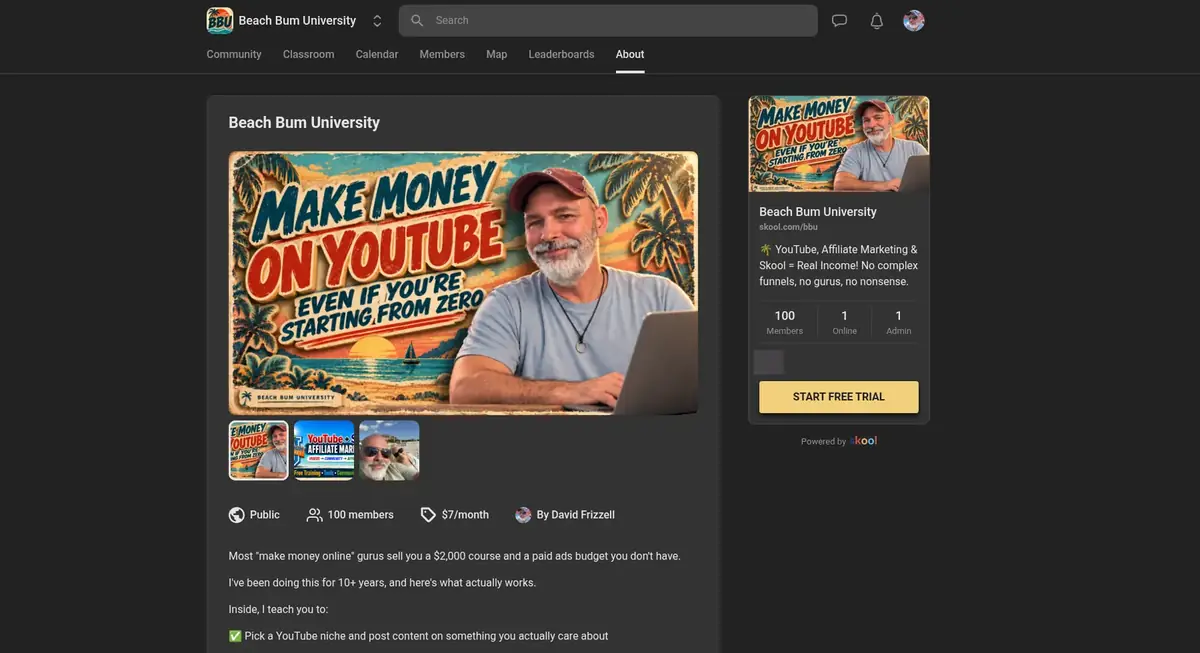 Greetings from Skool
The screenshots on this page are from Beach Bum University, my newest Skool group. See it live at skool.com/bbu.
What is Skool?
Skool is an online community platform. Each group gets a community feed, a Classroom for courses, a calendar for live calls, a members list, a member map and a leaderboard. Groups can be free or paid, and Skool handles the payments.
Skool isn't just where you host a group. It's also a place people browse. Members join other groups from the same account, which is why Discovery works. You'll also see the name Alex Hormozi tied to Skool, and the Skool Games, which I cover further down.
You can see a real group, mine, at skool.com/bbu.
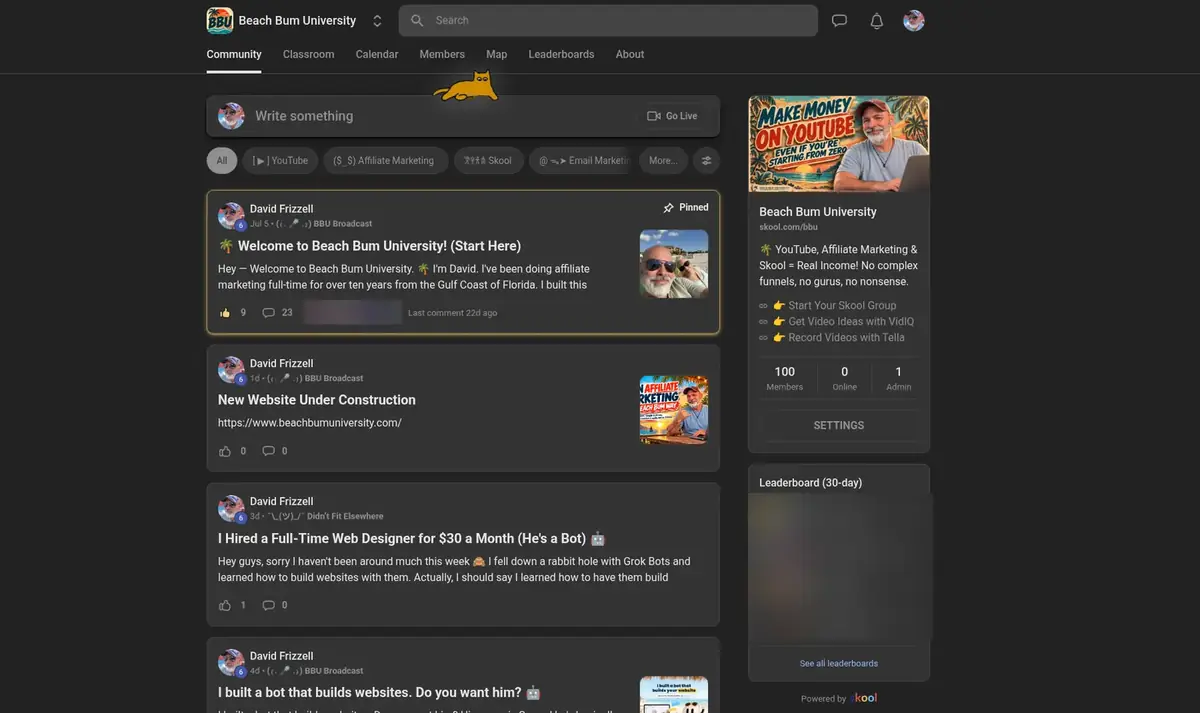
Two plans, both with a 14-day free trial
The difference that matters most is the transaction fee.
Hobby
$9/mo
+ 10% + 30¢ per transaction- Community, Classroom, calendar, map, leaderboard
- Paid or free group
- Card processing included in the fee
- Best while your group is small
Pro
$99/mo
+ 2.9% + 30¢ (3.9% + 30¢ above $900)- Everything in Hobby
- Much lower transaction fee
- Card processing included in the fee
- Pays for itself once your group grows
From skool.com/pricing and Skool's payments FAQ. Skool has changed pricing before, so check current pricing before you buy.
Skool's own subscription isn't refundable. There's an option to switch to annual billing; I couldn't confirm the discount, so check the pricing page.
The math: what Skool takes from each paying member
| Price | Hobby fee | Pro fee | You keep (Hobby / Pro) | Pro wins at |
|---|---|---|---|---|
| $9/mo | $1.2010% = $0.90 + $0.30 | $0.562.9% = $0.26 + $0.30 | $7.80 / $8.44 | 141+ paying members |
| $29/mo | $3.2010% = $2.90 + $0.30 | $1.142.9% = $0.84 + $0.30 | $25.80 / $27.86 | 44+ paying members |
| $49/mo | $5.2010% = $4.90 + $0.30 | $1.722.9% = $1.42 + $0.30 | $43.80 / $47.28 | 26+ paying members |
| $99/mo | $10.2010% = $9.90 + $0.30 | $3.172.9% = $2.87 + $0.30 | $88.80 / $95.83 | 13+ paying members |
How I worked it out. Hobby fee = price × 10% + $0.30. Pro fee = price × 2.9% + $0.30. Example at $29 a month: Hobby is $2.90 + $0.30 = $3.20 and Pro is $0.84 + $0.30 = $1.14.
When Pro pays off. Pro costs $90 a month more than Hobby. Divide that by the fee you save per member. At $29 you save $2.06 per member, so Pro wins once you have more than 43 paying members. Charge $99 and it's only 13.
Hobby or Pro? Plug in your numbers.
Your monthly price per member
Paying members
Uses Skool's posted rates: Hobby $9 + 10% + 30¢, Pro $99 + 2.9% + 30¢ (3.9% above $900). Card processing is included. Growth Boost cuts aren't included.
Member payments each month$1,450
HobbyBetter
- Plan
- $9
- Transaction fees
- $0
You keep$0
ProBetter
- Plan
- $99
- Transaction fees
- $0
You keep$0
Growth Boost members. If Skool brings you a member through Growth Boost, it keeps a cut of what that member pays: 30% by default. At $29 that's $8.70. You only pay that on members Skool brought in, never on your own.
My take: start on Hobby to test your idea for $9. Once you have a few dozen paying members, move to Pro.
Free traffic, and ads Skool pays for
This is the part no other platform I used had, and it's why about half my sign-ups come from inside Skool.
How Skool Discovery works
Discovery is Skool's search-and-browse page for groups. People who are already on Skool search a topic and find yours. According to Skool's Discovery FAQ, a group has to meet minimums for members, posts and activity to show up. Ranking is based on member growth, engagement and retention, with human review. Skool penalizes bots, taking payments off-platform and owners who go inactive.
So the way to rank in Discovery is the same way to run a good group: post, answer, keep members around.
Growth Boost and Skool Ads
Here's the part that blew my mind. Skool will run ads for your group on Facebook and Instagram, with its own ad budget. It works like an affiliate deal: you agree to pay Skool a commission on the members it brings you, and Skool pays for the ads that bring them. I've never been on a platform that said, in effect, "we want to run ads for you, because the better you do, the better we do."
This is crazy.
How it works, per Skool's Growth tab and Skool Ads and traffic sources pages:
- Skool spends its own Meta ad budget promoting eligible groups, and also boosts them in Discovery search.
- Growth Boost is on by default. You can switch it off in Settings > Discovery.
- Skool writes the ads for you: up to 10 versions built from your cover image, About page and price. You don't set a budget or design anything.
- Skool takes a cut only on members it brings in: 30% by default (Skool's example: $3 of a $10 price). You can raise the % to get more promotion, and members who already joined keep the rate they joined at.
- This cut is separate from Skool's affiliate program.
- Only paid groups qualify. Free and freemium groups aren't eligible.
The 4 Growth Boost levels
My view: you'd happily pay an affiliate for a new member you'd never have found, and that's how this works. Bring me more students.
New groups don't show up right away
Per Skool's help center, a new group needs the basics in place. Once it meets the minimum, Skool's team reviews it, and it usually shows up in Discovery within an hour or two.
Skool's ranking boosts call out high-quality artwork and About page, an interesting niche, authentic engagement and an active owner.
Two About page tips from Skool: the About page is "essentially a landing/checkout page for your group," and links in its description don't work, on purpose. So sell the group with images, a short video and a clear description.
Sources: why isn't my group in Discovery, Discovery FAQs, About page setup.
Skool is the merchant of record for your sales
It processes every payment, handles the tax, and pays you every Wednesday.
Skool processes payments
Every charge runs through Skool's merchant account. You connect your bank through a Stripe Express account Skool creates for you. You can't use your own existing Stripe account.
Payouts
Your balance pays out every Wednesday. US deposits usually take 1 to 3 business days, international 3 to 5. The first payout gets extra checks and can take up to 14 days.
Tax is handled
Skool collects and pays EU VAT and sales tax for you, added on top of your price. Skool's example: a $100/month product in Germany becomes $119/month with 19% VAT.
Limits and bigger prices
A single charge can be up to $100,000. Pro's rate steps up above $900 to 3.9% + 30¢. Skool's example: a $999 sale pays out $959.74 on Pro. On Hobby it would cost $100.20 in fees, leaving $898.80.
On sales under $900, Pro pays for itself once your member payments pass about $1,268 a month ($90 extra plan cost ÷ the 7.1-point fee gap). Sources: Skool payments FAQ, payment terms. Hobby $999 and the $1,268 line are my arithmetic on Skool's published rates.
Tap a card to open it
Every feature lives in the same toolbar at the top of the group. Details are from skool.com/features and Skool's help center.
What's new on Skool
- Skool Call: built-in live calls on both plans, with screen share, recording and a 14-day download window.
- Growth tab: see the ads Skool is running for you and what it takes to reach each of the 4 Growth Boost levels.
- Freemium and tiers joined free, subscription and one-time pricing, plus one-time course sales.
- Close doors and trial locks: pause new sign-ups without losing your place, and keep some lessons for paying members only.
💬Community feedPosts, categories, likes and comments
The home tab is a feed. Members post, comment and like, and you sort posts into categories so things stay findable. You can add photos, GIFs, polls and @mentions, and members can upload video straight into posts and comments. Pin your welcome post and rules at the top. Likes are more than a vanity number, because they feed the points system.
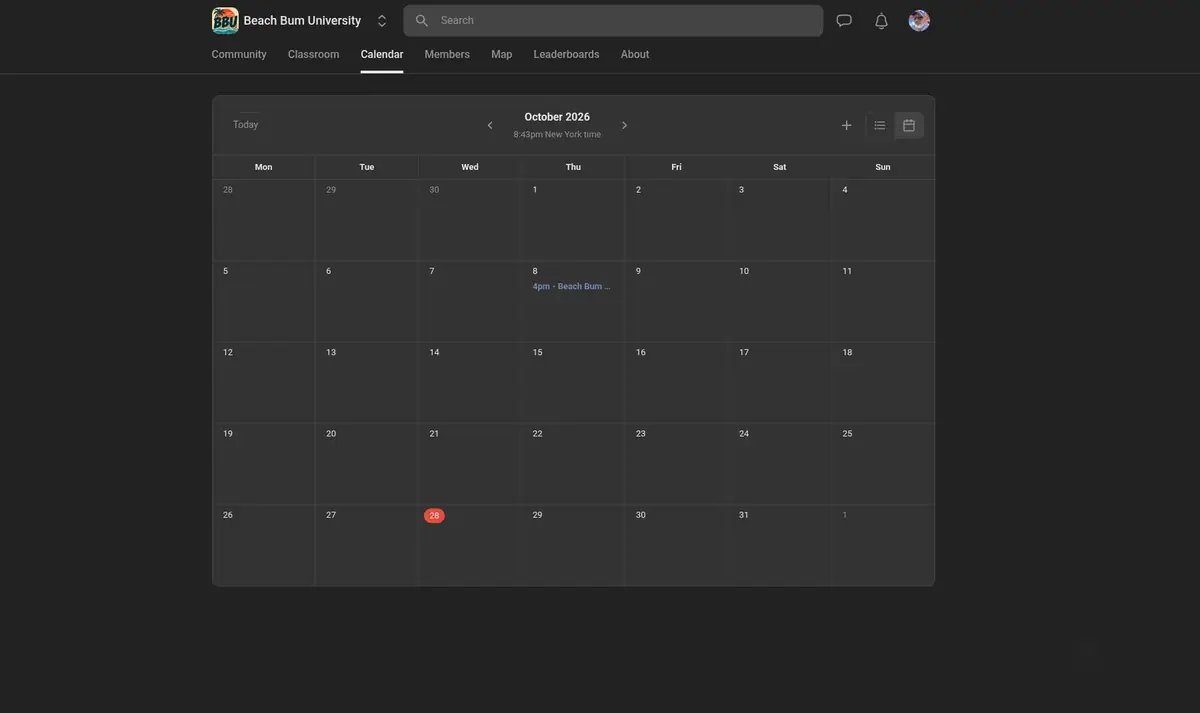
🎓ClassroomCourses with modules, video lessons and resources
The Classroom holds your courses. Each lesson has a video, text under it, and links or files. My setup is simple: one video per lesson, a short write-up, and links to the tools I use. You can upload video straight into a lesson, so you don't need YouTube, Vimeo or Loom (those still embed if you prefer). Skool auto-generates English captions for videos with sound, timestamps under the video become chapters, and you can add a transcript to make the lesson searchable. Skool also tracks each member's progress, per Skool's video guide. A course can be open to everyone, unlock at a level, be sold as a one-time purchase, or be tied to a pricing tier.
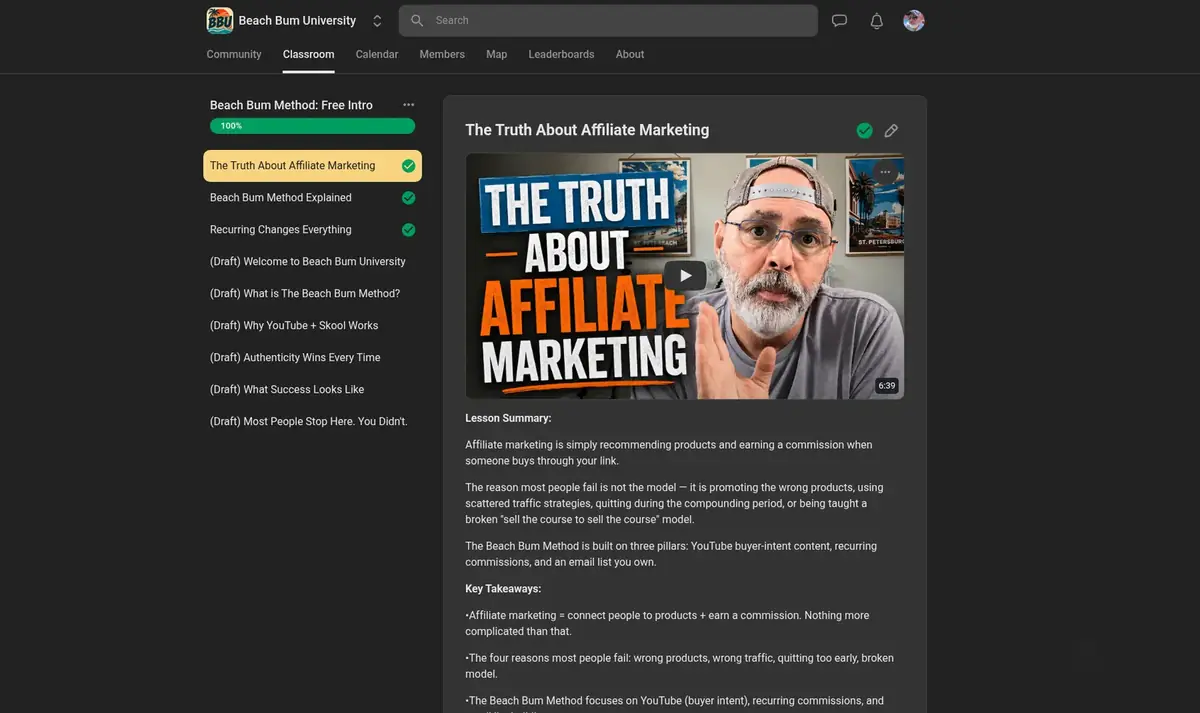
🏆Leaderboard and gamificationPoints, 9 levels, unlockable courses
Every like a member gets is a point. Points move members up 9 levels, from level 1 at 0 points to level 9 at 33,015, per Skool's points and levels guide. The leaderboard shows the top members. You can unlock courses at set levels, which gives people a reason to take part.
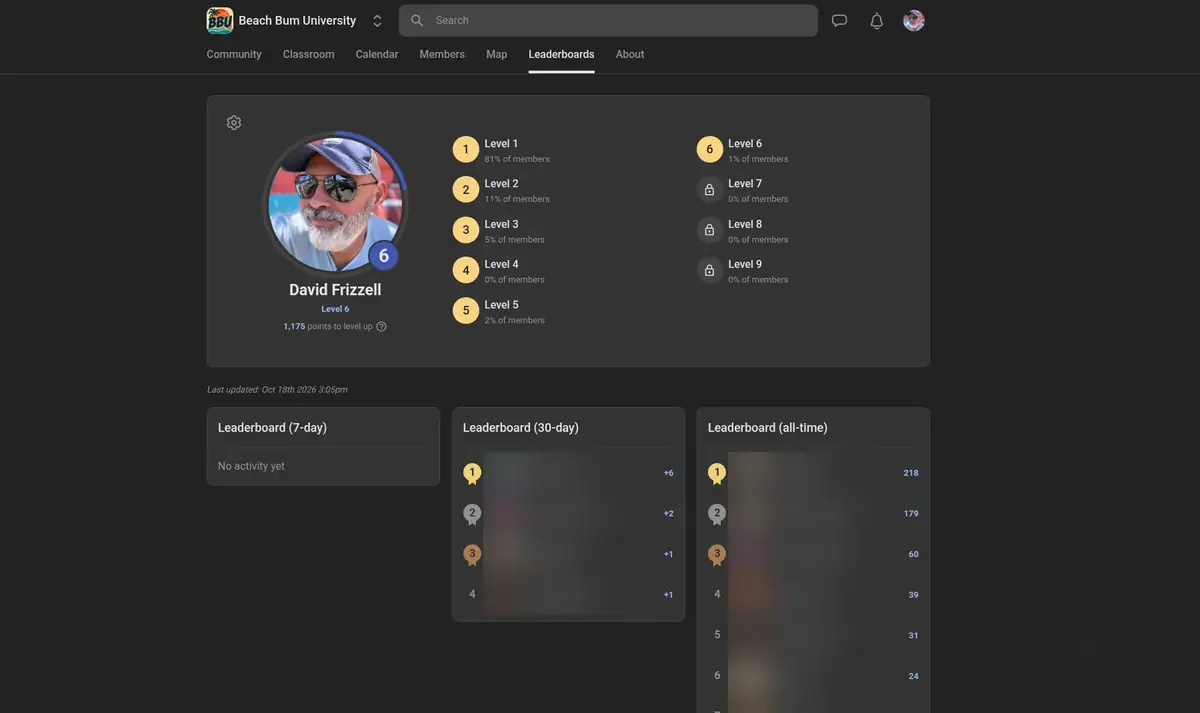
📅CalendarLive calls and events with time zones
Put your live calls, Q&As and office hours on the group calendar. Members see events in their own time zone and get reminder emails. When you add an event, Skool can create a Skool Call link for it, so the call happens right inside the group with no Zoom link to paste.
🎥Skool Call: built-in live videoNewNo Zoom needed, with recording
Skool Call is Skool's own video calling, built into the group in the browser and the app. Schedule a call from the calendar or hit Go Live for an instant hangout. On the call you can chat, share your screen, let members share theirs, change your background, mute or remove people, and record. After the call you get the recording to download (it expires after 14 days), so you can post it or add it to the Classroom. On Pro you can also run a webinar, a one-to-many presentation. Per Skool's Skool Call guide and webinar guide.
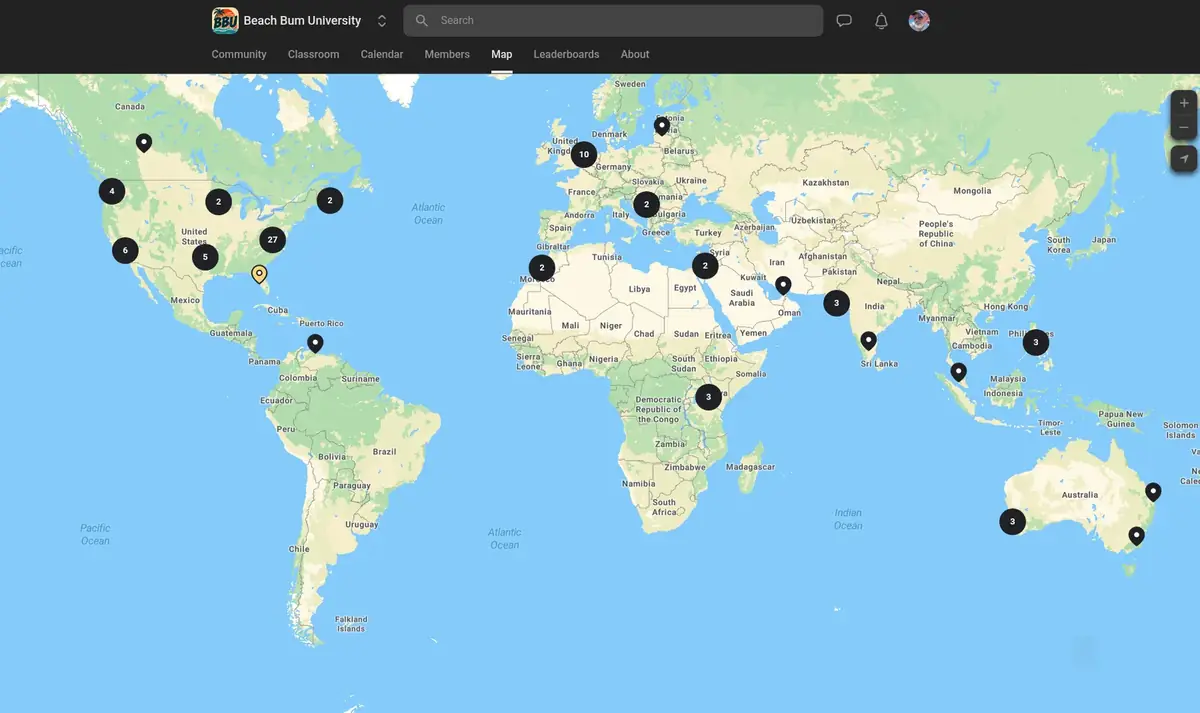
🌍Members and mapWho's in the group and where they are
The members tab lists everyone, and the map shows where they are. It's a small thing that makes a group feel like a real place.
💰Payments and pricing optionsFree, subscription, freemium, tiers, one-time
Skool has five pricing models: free, subscription (monthly or annual, with an optional 7-day free trial you can offer your members, separate from your own 14-day owner trial), freemium (a free plan plus paid upgrades), tiers (2 or 3 paid plans with their own benefits) and a one-time payment. You can also sell a single course with a one-time Buy Now price. If you offer a free trial, you can lock a course, module or page so trial members see an upgrade prompt instead, and free members in a freemium group get an Upgrade button that opens your plans.
Need a break from new sign-ups? Close doors (Settings, then Pricing) stops new joins while current members keep access and billing, per Skool's close doors guide. Paid members can also leave a star rating and review after 30 days, shown on your About page, per Skool's reviews guide. Card processing is part of Skool's fee, so there's no separate Stripe bill to keep track of.
Make It Rain: green "$99 from..." pop-ups stack up in the corner of your group, each with a cash-register cha-ching. The celebrity names in my clip are joke demo names, not real members.
🤝Group affiliate programYour members promote your group, Skool tracks and pays them
This is one of my favorite features. On Pro, open your group settings, go to the Affiliates tab and set a commission %. Every member gets their own referral link. When someone joins through it, Skool tracks the referral (14-day last-touch cookie), holds the commission as pending for 14 days in case of a refund, and then the member cashes it out to their own bank account through Skool. You don't need affiliate software, tracking links or a payout spreadsheet. You can also turn on a commission for a single paid course. Only members can earn, not owners or admins, and a referrer needs an active membership. Per Skool's member affiliates guide and referral and payout guide.
📩Chat, notifications and email broadcastsDMs, digests and one-click email to members
Members can chat one-to-one, follow posts and get notifications in the app and by email, plus email digests of popular posts. One profile works across every group they join, and Skool's interface comes in several languages, set from each person's browser. As the owner you can email a post to all members with one click. It's a broadcast, not an email marketing tool: no lists, tags or sequences.
📊Dashboard and growth statsMetrics, traffic sources, Growth tab
A dashboard tracks growth and engagement for the group and for each member. The traffic sources view shows visitors, sign-ups and conversion rate by source (Discovery, affiliates, social, your website and more), and the Growth tab shows your Growth Boost level and ads.
🔌Plugins and integrationsZapier, webhook, AutoDM, membership questions
Settings has a Plugins menu. On both plans: membership questions (to screen people and collect an email) and options to unlock chat or posting at a level to cut spam. On Pro: AutoDM to welcome new members, an onboarding video, instant approval, a webhook for invites from an outside checkout, and Zapier (send new paid members or membership answers to your CRM, invite members, unlock courses). There's also Meta pixel and Google Ads tracking. See Skool's plugins guide.
📱Mobile appiOS and Android
Members can read posts, comment, watch lessons, join calls and get notifications from the Skool app.
The angle most reviews miss
If you teach the tools you use, a Skool group does two jobs. It earns a membership fee, and it puts your recommendations where engaged people see them.
1. Put your tool recommendations in the Classroom
In my groups, every lesson that uses a tool has that tool linked right under the video, with my affiliate link. When someone is following a lesson step by step, that's the moment they sign up. Some examples from what I teach: systeme.io for funnels, Kit for email and Tella for recording lessons.
- Record the lesson showing the tool doing the job.
- Write the lesson text. My shortcut: paste the video transcript into ChatGPT or Claude and have it draft the text, then edit it.
- Add your links under the video with a clear disclosure.
- Add a resources post in the feed with every tool in one place.
How I use YouTube and Skool together.
Three affiliate programs. Don't mix them up.
Skool's own affiliate program
40% recurring
For as long as the group owner you refer stays on Skool, per the Skool affiliate program page. Groups created by your members are attributed to you automatically, so if you teach people to build communities, every member who starts their own group counts.
Your group's member referrals
You set the %
On Pro, your members get their own links to refer friends to your group, and Skool tracks and pays them.
Growth Boost
30% default
The cut Skool keeps on members its own ads bring you, for as long as they stay. Never on members you bring in yourself.
It was easy
My setup was very limited stuff: a course, an about page, some pictures and a welcome post.
- Start the 14-day free trial and name your group around what people search for.
- Write the about page. Who it's for, what they'll learn, what's inside.
- Build one course in the Classroom. Mine started as a set of short videos, one per module.
- Post a welcome post and pin it.
- Pick a price and, on Pro, turn on member referrals.
- Send people to it. I make YouTube videos and the call to action is to join the group.
The honest part
There's no passive income. None of this is turnkey. You have to do the work, and you have to do it every day.
I see people put a Skool group together and then wonder why nobody joined. It's because nobody knows about it. Discovery helps, but you still need to make content and show up for your members.
You don't need a huge group. You just need the right people in it.
The Skool Games are a Skool competition for group owners, centered on growing a group. Winners get a mastermind with Alex Hormozi. You'll see "Skool Games winners" and leaderboards all over YouTube.
My advice: don't build your plan around a contest. Build a group people want to stay in. The rules and prizes change, so check Skool for the current version if you want to join.
13 things I love, 4 I don't
Pros (13)
- Simple for members: one toolbar, nothing hidden
- Community, Classroom, calendar, members and map in one place
- Gamification with points, 9 levels and a leaderboard
- Lock courses until members reach a level
- Discovery sends you people already on Skool
- Growth Boost: Skool pays for Facebook and Instagram ads for your paid group
- Payments built in, card processing included in the fee
- Cheap to start: Hobby is $9 a month
- Built-in group affiliate program (Pro): members promote your group, Skool tracks and pays them
- 40% recurring commission when you refer other group owners
- Mobile apps for iOS and Android
- Built-in video calls (Skool Call) with recording, so no Zoom bill
- Five ways to price: free, subscription, freemium, tiers or one-time
Cons (4)
- Design is fixed: every group looks like a Skool group
- No funnels, landing pages or email sequences
- Basic analytics compared with bigger platforms
- Hobby's 10% fee adds up as you grow (Pro fixes that)
My fix for the cons: use Kit for email and systeme.io for funnels and landing pages, and send people to the Skool group from there.
Common complaints online, on Reddit and Trustpilot, are about billing, cancellation and support speed, plus low-quality groups run by other owners. I haven't had those problems, but read the payment terms before you start.
Skool vs Circle, Mighty Networks, Heartbeat, Kajabi, systeme.io and Facebook Groups
I've used the first three myself. Here's how Skool stacks up against them and the other names people ask about.
Swipe the table sideways →
| Platform | Price | Transaction fee | Courses | Gamification | Built-in discovery | Live video | Platform pays for ads | Best for |
|---|---|---|---|---|---|---|---|---|
| Skool | Hobby $9/mo; Pro $99/mo | 10% + 30¢ (Hobby); 2.9% + 30¢ (Pro); processing included | Yes | Points, 9 levels, leaderboard | Yes, plus Skool-paid ads | Yes, Skool Call (webinars on Pro) | Yes, Growth Boost (paid groups) | Simple paid community plus a course |
| Circle | $89/mo (annual) | Professional 2%, Business 1%, Scale 1%, Plus 0.5%, plus Stripe fees | Yes | Yes | Check current features | Check current features | Not offered as far as I can find | Branded community and website |
| Mighty Networks | Launch $79/mo annual, $95 monthly (check current pricing) | 2% + Stripe | Yes | Check current features | Check current features | Check current features | Not offered as far as I can find | Courses plus community |
| Heartbeat | $49/mo ($40 annual), up to 350 members | 5% / 2.5% / 1.25% by plan, plus Stripe | Yes | Badges | Check current features | Check current features | Not offered as far as I can find | Budget community with automations |
| Kajabi | Basic $179/mo ($143 annual) | No revenue share; card processing: check current pricing | Yes | Check current features | Check current features | Check current features | Not offered as far as I can find | All-in-one courses, site and funnels |
| systeme.io | Free plan; Startup $17/mo | 0% | Yes | Check current features | Check current features | Check current features | Not offered as far as I can find | Funnels, email and courses |
| Facebook Groups | Free | Check current pricing | No built-in classroom | Check current features | Facebook search | Check current features | Not offered as far as I can find | Free audience building |
Prices from each platform's own pricing pages where I could check them. Circle's transaction fees come from circle.so/pricing. "Check current pricing" or "check current features" means it wasn't confirmed, and "not offered as far as I can find" means I looked and couldn't find a program where the platform pays for ads for your community. Check before you buy.
Skool vs Circle
Skool wins because members find things fast. Circle gives you spaces inside spaces, and when I used it, my members got lost. Skool also has built-in gamification and Discovery traffic, which Circle never sent me.
Pick Circle if you want a fully branded community on your own domain with lots of layout control, and you have a team to manage it.
Skool vs Mighty Networks
Skool wins because it's simpler to run and simpler to join, and Discovery brought me sign-ups that Mighty Networks never did.
Pick Mighty Networks if you want more customization and a branded app, and you're fine with a more complex setup.
Skool vs Heartbeat
Skool wins because members don't have to learn a layered layout, and Skool brings you traffic. Heartbeat has more automation options, but it didn't send me new members.
Pick Heartbeat if you're on a tight budget with a small group, want built-in automations, and already have your own traffic.
Skool vs Kajabi
Skool wins because it's far cheaper to start ($9 vs about $143 a month on Kajabi Basic billed yearly) and built around an active community instead of a course storefront. Members stick around because of the people, not just the videos.
Pick Kajabi if you want courses, a website, funnels and email in one paid tool and don't mind paying more for it.
Skool vs systeme.io
Skool wins because its community is the main event: gamification, Discovery and Skool-paid ads. systeme.io has no audience of its own to send you.
Pick systeme.io if you need funnels, email and courses on a free plan with 0% transaction fees. Honestly, I use both. Read my systeme.io review.
Skool vs Facebook Groups
Skool wins because you own the experience: no algorithm burying your posts, no ads beside your content, and a real Classroom, calendar and payments built in.
Pick Facebook Groups if you only want a free group to build an audience and don't plan to charge or run a course.
Other Skool alternatives people search for include Whop, Patreon, Discord, Teachable and Stan Store. They aren't built around the same mix of community, course and discovery, so I've kept them out of the table.
Is Skool worth it? Yes.
If you've got knowledge to pass along, a skill, a hobby or an interest, and you want to bring people together to teach and connect, Skool is the platform I'd use. I've used Circle, Mighty Networks and Heartbeat, and Skool is the one I stayed with.
It's simple for members, quick to set up, cheap to test at $9 a month, and it's the only platform that sent me members on its own through Discovery and its ads. The trade-offs are real (fixed design, no funnels or email), and they're easy to fix with other tools.
Just go in knowing it's work. Make content, show up every day, and look after the people who join.
Straight answers
Is Skool worth it?
For most people starting a paid community with a course, yes. Skool is simple for members, has a built-in Classroom, gamification and a calendar, and Discovery can send you people who are already on Skool. I tried Circle, Mighty Networks and Heartbeat before Skool and stayed with Skool. It's not passive income, though. You still need to make content and show up.
Is Skool legit or a scam?
Skool is a legit software company with public pricing, a help center and payment terms. Complaints you see on Reddit and Trustpilot are mostly about billing, cancellations, support speed and low-quality groups run by other people. Check any group before you pay to join it.
How much does Skool cost?
Skool has two plans on skool.com/pricing: Hobby at $9 a month and Pro at $99 a month. Both come with a 14-day free trial, and annual billing is available.
How much does Skool take from creators?
On Hobby, Skool takes 10% + 30 cents per transaction. On Pro, it's 2.9% + 30 cents (3.9% + 30 cents above $900). Card processing is included. If you turn on Growth Boost, Skool also takes a cut of members it brings in for you: 30% by default, and you can raise it for more promotion.
Is Skool free? Is there a free plan?
There's no free plan for running a group, but there's a 14-day free trial. Joining a free group as a member costs nothing.
Skool vs Circle: which is better?
Circle is more customizable and has more layers and spaces. Skool is simpler, with one toolbar, built-in gamification and Discovery. I used Circle and my members had trouble finding things, so I moved to Skool.
Skool vs Kajabi: which should I pick?
Kajabi is an all-in-one course, website and funnel platform starting at about $143 a month billed yearly. Skool is cheaper and centered on community. If you want funnels and email in one tool, look at Kajabi or systeme.io. If you want an active community with a course, pick Skool.
How does the Skool affiliate program work?
Skool pays a 40% recurring commission for as long as the owner you refer stays on Skool, per skool.com/affiliate-program. Separately, group owners on Pro can turn on member referrals for their own group and set the commission members earn for referrals.
What is Skool Discovery?
Discovery is the search and browse page inside Skool where people find groups. Skool ranks groups by member growth, engagement and retention, with human review. About half of my sign-ups come from people already on Skool.
What is Skool Growth Boost? Does Skool run ads for my group?
Yes, if your group is paid. Growth Boost is on by default and you can turn it off in your group settings under Discovery. Skool pays for the ads itself, on Facebook and Instagram, and boosts your group in Discovery. In return, Skool keeps a 30% commission (the default, and you can raise it) on paid members it brings you, for as long as they stay. Members you bring in yourself only pay the normal fees. Free and freemium groups don't get ads.
Does Skool have built-in video calls, or do I need Zoom?
You don't need Zoom. Skool Call lets you host live video calls inside your group, scheduled from the calendar or started on the spot with Go Live. You can chat, share your screen, let members share theirs, mute or remove people, and record the call. Recordings can be downloaded for 14 days, then posted to the group or added to the Classroom. Pro also has webinars for one-to-many presentations.
What are the Skool Games?
The Skool Games are a competition Skool runs for group owners, tied to growing a group. Rules and prizes change, so check skool.com for the current version before you plan around it.
Does Skool have email marketing?
Not really. You can broadcast a post to your members by email, but there are no sequences, automations or segments, so pair it with an email tool like Kit.
Can I put affiliate links in my Skool classroom?
Yes. I put the tools I teach right under each lesson video in my Classroom, with my affiliate links. Follow each program's disclosure rules and Skool's terms.
Does Skool really work?
As a platform, yes: it runs your feed, courses, live calls and payments in one group and pays out every Wednesday. Whether a group grows is up to you. Skool's own Discovery ranking rewards member growth, activity and retention, so a group that posts, answers and keeps members around does best.
Does Skool have an app?
Yes. Skool has iOS and Android apps where members can read posts, comment, watch lessons, join calls and get notifications. Skool's help center says you can go live "natively in the app or on the browser."
Can I get a refund on Skool?
No. You can cancel anytime; the group is archived read-only at the end of the period. Skool doesn't refund plan fees for full or partial periods, and transaction fees are non-refundable.
Does Skool handle sales tax and VAT?
Yes. Skool is the merchant of record, so it collects, files and pays EU VAT and sales tax, added on top of your price. Payouts go to your bank through a Stripe Express account Skool sets up; you can't use your own Stripe account.